Have you ever watched a video on YouTube and wanted to share a specific moment with your friends? Or have you ever scrolled through the comments section looking for a particular point in the video, only to get lost in the sea of comments?
As a creator or viewer, it can be frustrating when trying to find specific moments in a lengthy video. However, there is an easy solution that can enhance engagement and improve the audience experience – timestamping.
What is Timestamping?
Timestamping involves adding links to specific chapters or critical moments in the video description or comment section. This lets viewers easily navigate your content without getting lost or frustrated.
So, What is a YouTube Timestamp Link?
YouTube timestamp video links are direct URLs that take viewers to a specific point in a video. These links are generated by adding the start time of the desired section to the video’s URL. When clicked, these links will take viewers straight to that exact moment in the video before we jump in and explore how to timestamp YouTube comments. Let’s take a look at:
Why Timestamping YouTube Comments is Important
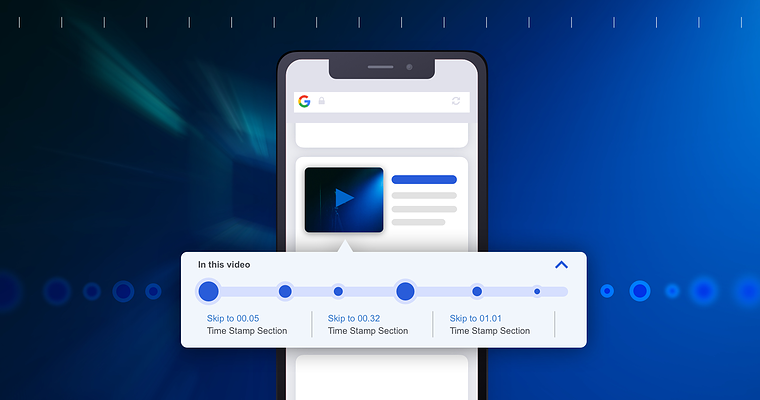 Courtesy: Searchenginejournal.com
Enhances the Viewing Experience
YouTube is an incredible platform for sharing videos with people from all over the world. With so much content available, finding specific moments in a video relevant to your interests can be challenging. Timestamping comments on YouTube help viewers find these moments quickly and easily.
For example, suppose someone posts a comment under a video about cooking. In that case, they may want to timestamp comments (set timed comments) when the chef adds a particular ingredient or demonstrates a technique. This way, other viewers interested in that specific part of the video can jump right to it without having to search through the entire video.
Provides Context for Comments
Timestamps can also provide context for comments and make them more relevant. For instance, if someone posts a comment under a music video saying they love the guitar solo at 2:30, timestamping their comment helps others understand which part of the song they’re referring to.
Furthermore, timestamps can help creators understand which parts of their videos resonate with viewers. If many people are timestamping comments at specific points in a video, it’s likely those parts are particularly engaging or informative.
It Helps Creators Improve Their Content
In addition to understanding what’s working well in their videos, creators can use timestamped comments to identify areas where they can improve their content. For example, if several people commented that they found one tutorial section confusing or challenging to follow, the creator could rework that section or add more explanation.
The Key Take Away?
Overall, timestamping comments on YouTube enhances both creators’ and viewers’ experiences by making it easier to find relevant information quickly and providing valuable feedback on what works well and could be improved.
So why would you want to timestamp a comment on YouTube? The answer is simple: it makes your comment more useful and relevant! Whether you’re commenting on a funny clip or a serious tutorial, timestamping your comment can help others find the most exciting or informative parts of the video quickly and easily.
How to Timestamp YouTube Comments

 Courtesy: YourSixStudios, YouTube
Let’s dive into how to timestamp YouTube comments. First, remember that adding timestamps to YouTube comments is straightforward. You can do it by typing the time in the comment box using the format minutes:seconds (e.g., 2:30). This will create a hyperlink that takes viewers directly to that point in the video when they click on it.
Another way to add timestamps is by clicking on the “Share” button below the video and selecting “Start at.” This feature allows you to select a specific time in the video, generating a link that starts playing from that point.
But then, you can timestamp much more than just comments on YouTube. Let’s go beyond how to timestamp YouTube comments and learn how to timestamp other “time-stampable” features on YouTube.
How to Add Timestamps on YouTube
 Courtesy: JustinBrown, YouTube
Adding Timestamps to YouTube Descriptions
 Courtesy: JustinBrown, YouTube
Adding timestamps in a YouTube description is easy. Here’s how:
- Open the video you want to add timestamps for.
- Click on “Share” below the video player.
- Check “Start at” and enter the time when you want your timestamp to start.
- Copy the link generated by YouTube.
- Paste this link into your description box wherever you want your timestamped link.
You can repeat these steps as many times as you like for different parts of your video.
How to Timestamp YouTube Description for Video Chapters?
 Courtesy: JustinBrown, YouTube
If you have longer videos with distinct sections, organizing them into chapters using timestamps is best. This way, viewers can see an overview of what’s covered in each section and jump straight there if they want.
To create chapter timestamps:
- Decide on the sections or chapters of your video.
- Find out at what time each chapter starts.
- Add these times as separate start times when generating links from Step 3 above.
- Add titles for each section/chapter in your description box to their respective links.
How to Embed YouTube Timestamps?
If you’re embedding a YouTube video on another website or platform, you can also include timestamp links within it.
Here’s how:
- Open the video and find the point where you want your timestamped link.
- Pause at that point and right-click on the player screen.
- Select “Copy Video URL at Current Time.”
- Paste this link wherever you want it to appear.
Why YouTube Creators Should Embrace Timestamping
 Courtesy: Pexels
Now you’ve discovered how to timestamp your YouTube videos and YouTube comments, let’s delve deeper and understand how timestamping can boost your channel’s performance.
Increases Viewer Engagement and Interaction
Timestamping YouTube comments can significantly increase engagement and interaction with viewers. By adding timestamps to the comment section, content creators allow their viewers to jump directly to specific parts of the video that they find interesting or relevant. This feature increases viewer engagement and can grow your subscriber rate by allowing them to quickly access the content they want to see without watching the entire video.
Timestamped comments encourage discussion among viewers as they can easily reference specific moments in the video. This fosters a sense of community and encourages feedback from viewers on particular aspects of the content.
Helps You Identify Popular or Controversial Segments
Another benefit of timestamping YouTube comments is that it helps content creators identify popular or controversial parts of their videos. By analyzing which parts of a video receive more comments, creators can gain insight into what resonates with their audience and tailor future content accordingly.
Furthermore, by identifying controversial sections, creators can address any issues viewers raise and clarify any misunderstandings. This helps build trust between the creator and their audience while improving subsequent videos’ quality.
Provides a Better User Experience
As mentioned earlier, timestamped comments provide a better user experience for viewers by allowing them to jump directly to specific parts of a video. This feature is especially useful for longer videos where users cannot watch everything in one sitting.
By providing timestamps in the comment section, creators make it easier for users to navigate their videos and find relevant information. This improves the overall user experience and encourages users to stay engaged with content for longer.
Increases Watch Time
Timestamping YouTube comments can also improve search engine optimization (SEO) by increasing watch time and reducing bounce rate. When users can jump directly to relevant video segments, they are more likely to stay engaged for longer periods. This increased watch time signals to YouTube that the content is valuable and relevant, which can improve its ranking in search results.
Reduce Bounce rate
Furthermore, by reducing the bounce rate (the percentage of users who leave a website after viewing only one page), creators can signal to YouTube that their content is engaging and encourages viewers to stick around. This can also improve SEO rankings and help drive more traffic to their videos.
Builds a More Engaging Community
Finally, timestamped comments help build a community around content by encouraging discussion and feedback from viewers. By providing timestamps in the comment section, creators make it easier for viewers to reference specific moments in the video when leaving comments.
This feature fosters discussion among viewers and encourages feedback on particular aspects of the content. As discussed earlier, this helps build trust between creators and their audiences while improving the quality of subsequent videos.
Other Benefits of Using Timestamps
Apart from making it easier for viewers to navigate through your content, using timestamps also has other benefits:
- The YouTube algorithm recognizes timestamped video links and displays them in search results, increasing your video’s visibility.
- Specific timestamp links can be shared with others, making it easy to direct people to relevant parts of your videos.
- The automatic video chapters feature can also create timestamps for longer videos. This feature automatically generates chapter titles based on the sections of your videos and makes it easier for viewers to find what they’re looking for.
Best Practices for Timestamping YouTube Comments
Use the HH:MM:SS Format
Timestamps are an essential tool in video content, especially on YouTube. They allow viewers to jump to specific moments in a video without having to watch it from start to finish. When timestamping a comment on YouTube, using the correct format is crucial. The standard format is HH:MM:SS (hours, minutes, seconds).
For example, if there’s an exciting moment at 1 minute and 20 seconds into the video, you would write “1:20” as your timestamp. Using this format helps other viewers easily find the moment you’re referring to and enhances their viewing experience.
Be Specific and Accurate When Timestamping
When timestamping a comment on YouTube, ensure you accurately pinpoint the exact moment you want to reference. Avoid using vague timestamps like “around 2 minutes” or “near the end of the video.” These timestamps don’t provide enough context and can confuse other viewers trying to find that particular moment.
Instead, be specific with your timestamps by using exact times. For instance, if there’s an important scene at 3 minutes and 45 seconds into the video, use “3:45” as your timestamp. This way, viewers know precisely where to go without wasting time searching for what they’re looking for.
Avoid Timestamping Irrelevant Moments
While providing helpful timestamps in your comments on YouTube videos is essential, avoid overusing them or referencing irrelevant moments in the video. Timestamps should only be used when necessary or when providing value to other viewers.
For instance, if there’s a funny joke 2 minutes and 30 seconds into a tutorial video about cooking pasta sauce that doesn’t relate directly to cooking pasta sauce but adds some humor to the video, it’s unnecessary to timestamp that moment. Timestamps should be used for relevant moments in the video that add value to other viewers.
Use Timestamps to Enhance Engagement
When used correctly, timestamps can significantly enhance engagement on YouTube videos. By providing helpful timestamps in your comments, you’re helping other viewers find what they’re looking for quickly and efficiently. This enhances their viewing experience and encourages them to engage with your comment or even the entire video.
For instance, if there’s a crucial scene at 5 minutes and 10 seconds into a movie trailer that sets up the movie’s plot, timestamping that moment can help others understand the movie without watching the entire trailer. This adds value to other viewers and enhances their engagement with your comment.
Don’t Overuse Timestamps
While using timestamps in your comments on YouTube videos can be helpful, avoid overusing them as it can clutter up the comment section. Try not to use more than two or three timestamps when commenting on a video unless necessary.
If you need to reference several moments throughout a video, consider creating a separate document with all your timestamps and sharing it with others who may find it helpful. This way, you’re still providing value without cluttering the comment section.
The Secondary Role of Comments on YouTube and Why Timestamping Matters
Comments play a secondary role on YouTube. While the primary focus is often on views, likes, and shares, comments offer a unique opportunity for viewers to engage with both the creator and other users. They provide an outlet for discussion, feedback, and even criticism.
However, despite their importance in fostering community engagement, comments can be overwhelming to navigate. Finding relevant information can be time-consuming and frustrating, with hundreds or thousands of comments per video. That’s where timestamping comes in.
Timestamping Helps Viewers Find Relevant Information Quickly
Timestamping involves adding timestamps to specific moments within a video. This allows viewers to jump directly to the section they’re interested in without watching the entire video or sifting through countless comments.
For example, imagine you’re watching a makeup tutorial on YouTube. You want to know which product the creator used at minute 3:45 but don’t want to spend time searching through all of the comments. If someone has timestamped that moment in the comment section, you can click on it and go straight to that part of the video.
This saves time for viewers looking for specific information and makes videos more accessible for those who may not have time to watch them in full.
Improving Overall User Experience on YouTube
By making videos more accessible and easier to navigate through timestamped comments, creators can improve their overall user experience on YouTube. Viewers are more likely to engage with content that they find valuable and easy to use.
Moreover, by providing value-added content through timestamps within their comment sections as creators themselves, creators increase viewer engagement while simultaneously building trust-based relationships with their audience members who feel like they are getting something extra from following along with them online!
Boosts Engagement and View Time
Creators can benefit from timestamped comments in several ways. First, it encourages engagement within the comment section, as viewers are more likely to leave a comment if they know that it will be helpful to others.
Second, by providing valuable information through timestamps, creators can attract new viewers searching for specific topics. For example, suppose someone is looking for a review on a particular product and sees that your video has been timestamped with relevant information. In that case, they may be likelier to click on your video than others.
Finally, timestamping can also help with SEO (search engine optimization), making videos more searchable and discoverable. By including keywords in their timestamps, creators can increase the chances of their videos appearing in search results.
Why Timestamping YouTube Comments Creates a Better User Experience
Timestamping YouTube comments is crucial for enhancing the user experience on the platform. By providing timestamps, viewers can easily navigate through lengthy videos and find the most relevant content they are looking for.
Creates a Greater Sense of Community
Timestamping helps viewers save time and creates a sense of community engagement. It allows them to jump into specific parts of a video that interest them and leave their feedback in the comment section at that particular moment. This feature encourages interaction between content creators and their audience, resulting in better engagement.
Makes Your Video Easier to Watch
You can also add timestamps to YouTube descriptions by including clickable links that lead directly to certain parts of your video. This feature is particularly useful when creating multiple-topic tutorials or longer videos.
Increases Viewer Retention Rates
For content creators, adding timestamps to their videos can increase viewer retention rates and attract new subscribers who appreciate the efficient use of their time. It also helps with SEO optimization, making it easier for search engines to index specific video sections.
How to timestamp YouTube comments: Conclusion
Timestamping is an easy yet effective way to enhance user experience on YouTube while increasing engagement rates among viewers and content creators alike. So next time you watch a video or leave a comment on YouTube, add a timestamp and contribute to the community.
However, When timestamping your comments on YouTube, it’s essential to follow some best practices on how to timestamp YouTube comments, such as being concise with your comments while still providing valuable feedback related to the timestamped moment. Avoid spamming or leaving irrelevant comments, which may negatively impact engagement rates.
FAQs
What is the purpose of timestamping YouTube comments?
Timestamping YouTube comments allows viewers to navigate through lengthy videos and find relevant content quickly, enhancing their user experience. It also encourages interaction between content creators and their audience.
How do I timestamp my comments on YouTube?
How to timestamp YouTube comments is pretty easy. To timestamp your comments, add the time code in the format of (HH:MM:SS) before your comment.
Can I add timestamps to YouTube descriptions?
Yes, you can include clickable links directly to certain parts of your video in your description.
What are the benefits of timestamping for content creators?
Adding timestamps can increase viewer retention rates, attract new subscribers, and improve SEO optimization by making it easier for search engines to index specific video sections.
What are some best practices for timestamping YouTube comments?
Some best practices include being concise with your comments while still providing valuable feedback related to the timestamped moment and avoiding spamming or leaving irrelevant comments, as this may negatively impact engagement rates.
The post How to Timestamp YouTube Comments and Enhance Audience Engagement appeared first on SubPals.
https://www.searchenginejournal.com/wp-content/uploads/2020/04/in-this-video-youtube-timestamps-in-google-search-5ea2437149ebd-760x400.png
https://www.subpals.com/how-to-timestamp-youtube-comments/
https://www.searchenginejournal.com/wp-content/uploads/2020/04/in-this-video-youtube-timestamps-in-google-search-5ea2437149ebd-760x400.png
https://subpalsservices.tumblr.com/post/720220531341901824


No comments:
Post a Comment